ProductSolutionsPricing
Product

The operating system behind the project.

Taskeeper connects commercial, delivery, workforce, financial and governance information that construction businesses usually manage in separate places.

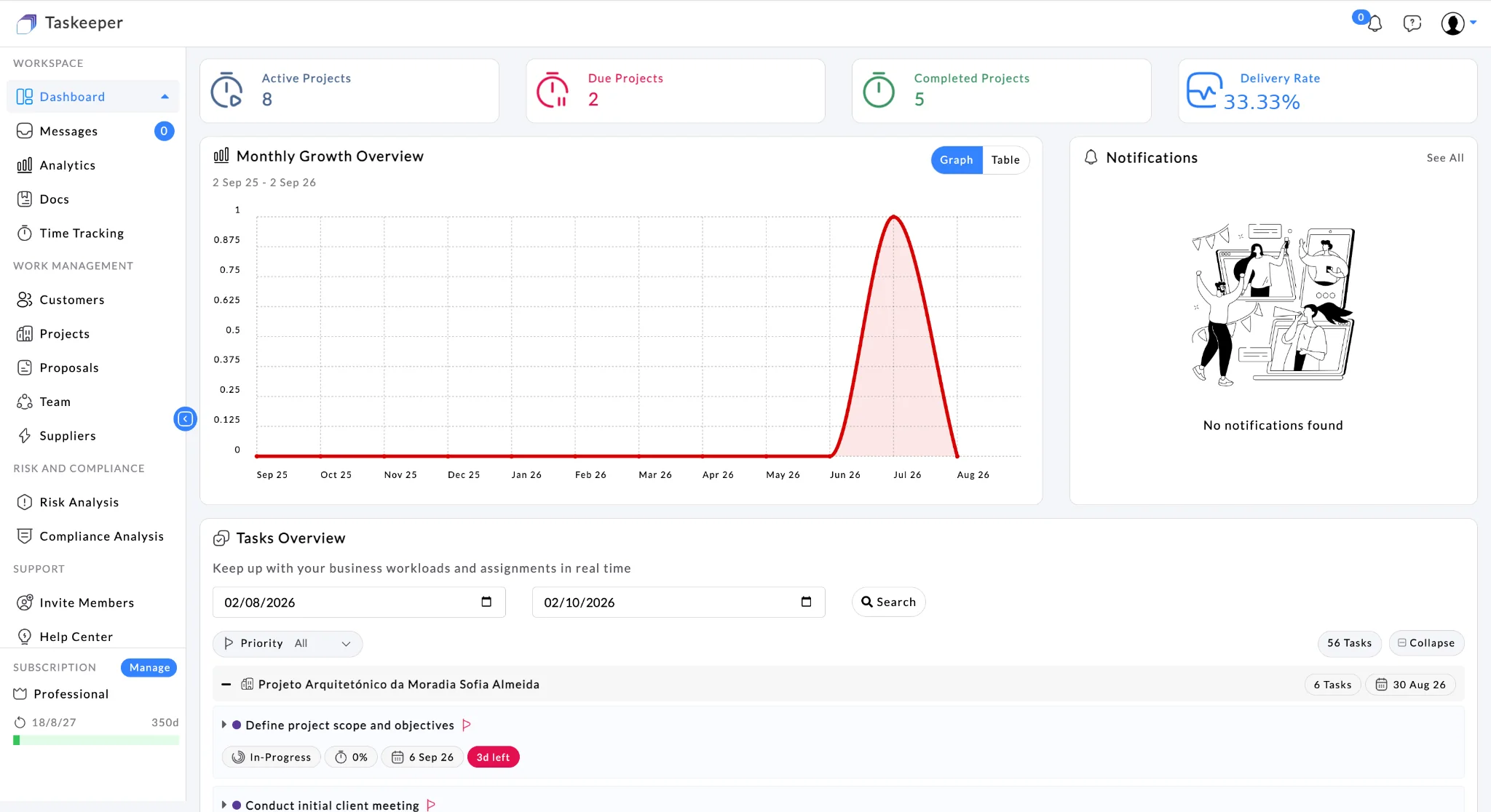
Current Taskeeper workspace views shown throughout this page are captured from the populated test environment.

Explore the current platform through real workflow-oriented product views.

Taskeeper dashboard showing the connected construction operations workspace
ResourcesTimeProjectsRiskAnalytics
Connected lifecycle

Features become more valuable when the data stays connected.

A customer does not disappear when a proposal is approved. A task does not exist independently from its resource cost. A payment does not exist independently from the work being delivered. Taskeeper keeps those relationships visible.

01 · WINCustomer → interaction → proposal
→
02 · PLANProject → budget → resources
→
03 · DELIVERTasks → time → evidence
→
04 · CONTROLCost → risk → compliance → payment
→
05 · IMPROVEAnalytics → decisions
01
Win the work

Move from customer conversation to accepted proposal to live project.

Prepare and revise customer budget assessments in Taskeeper, then convert an accepted proposal directly into a project so commercial context does not have to be rebuilt for delivery.

CRM

Customers, contacts & interactions

Maintain individual and organisation customers, contact details, addresses, affiliates and a chronological interaction history.

  • Organisation and individual customer records
  • Contacts and billing addresses
  • Customer interaction timeline
  • Customer-linked projects and proposals
Connects to Proposals · Projects
Commercial

Proposal management

Keep proposals close to customer context and turn approved work into a connected delivery workflow.

  • Proposal history
  • Customer relationship continuity
  • Commercial-to-project handoff
  • Supports lead-to-project workflow
Connects to Customers · Projects · Budgets
Example workflow

Enquiry → proposal → live project

Customer→Interaction→Proposal→Project

The sales context remains available when the team moves from winning the work to delivering it.

02
Plan the work

Build a project baseline people can actually deliver against.

Establish scope, customer requirements, location, dates, project manager, estimated budget and resource context before execution begins.

Projects

Project setup & delivery context

Create projects with the operational information needed downstream, not just a project name and due date.

  • Customer and project type
  • Project manager and references
  • Geolocated project address
  • Customer requirements and attachments
  • Estimated budget and delivery dates
Connects to Tasks · Payments · Compliance · Documents · Reports
Resources

Team, skills & pricing context

Manage internal and external resources with the information needed for assignment and cost visibility.

  • Internal and external resources
  • Job titles, teams and suppliers
  • Skills and business hours
  • Pricing tiers
  • Resource utilisation context
Connects to Tasks · Time sheets · Cost
Budget

Plan financial boundaries

Establish an initial project budget and maintain visibility as task and external delivery costs accumulate.

  • Estimated project budget
  • Task-level budgets
  • Resource cost context
  • Supplier/external cost context
Connects to Tasks · Suppliers · Payments · Analytics
03
Deliver the work

Coordinate execution, communication and field evidence in the same project context.

Tasks, messaging, comments, controlled client access and Photo Reportage help keep the work, the conversation and the evidence closer together.

Tasks

Tasks & subtasks with delivery and cost

Create task structures with assignees, work percentage, pricing tiers, budget and delivery dates.

  • Tasks and subtasks
  • Multiple assignees
  • Work percentage
  • Pricing tier selection
  • Budget, start and end dates
Views Table · Gantt · Kanban · Calendar
Time

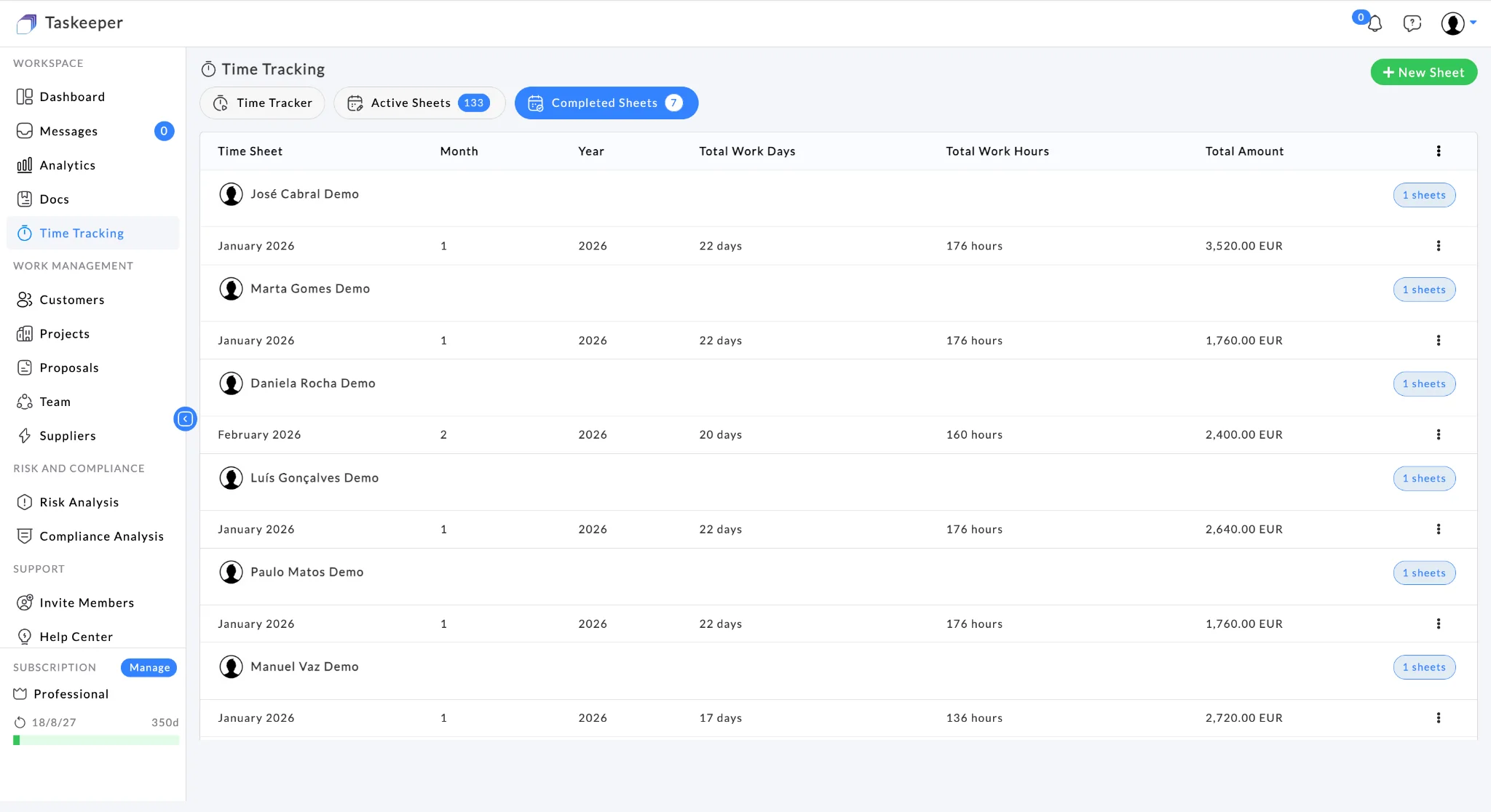
Monthly time sheets

Track work days, hours, hourly rate and calculated amount by resource and month.

  • Active and completed sheets
  • Total work days and hours
  • Hourly rate and calculated amount
  • XLS / PDF export
Connects to Resources · Cost · Projects
Evidence

Documents, reports & photo progress

Keep delivery evidence inside the same project context used to manage tasks and commercial milestones.

  • Project/task documents
  • Document search and tags
  • Project reports and exports
  • Photo reportage / progress evidence
Connects to Projects · Tasks · Handover
TableGanttKanbanCalendar
Site survey60% · €1,800
Technical package85% · €6,400
Client review40% · €2,100
HandoverPlanned
Product views from current workflows

See the operating model in the interface.

Resource planning, timesheet review, project control and client visibility are not separate stories—they are different views of the same operational data.

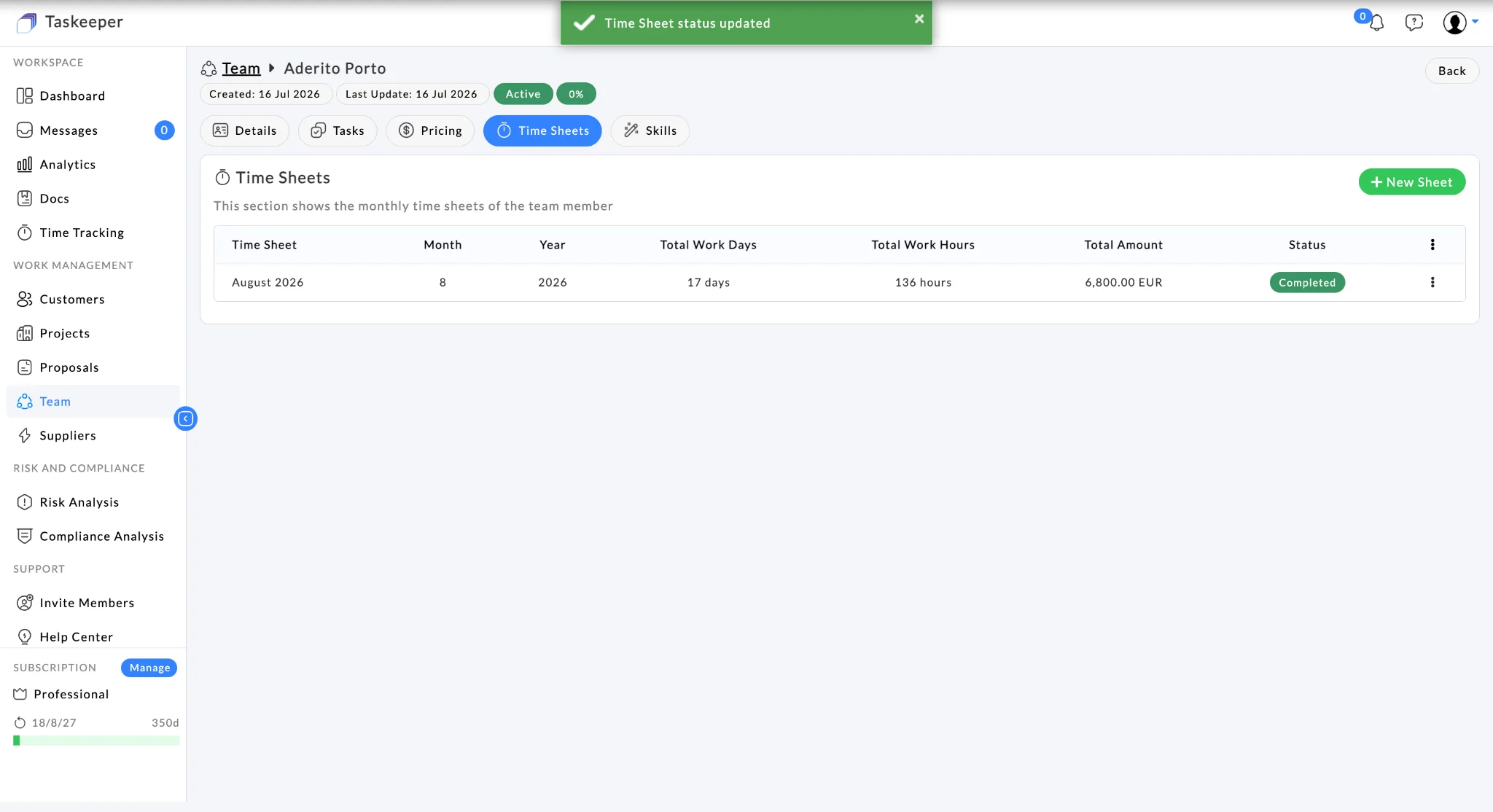
Resource & capacity planning

Review utilisation across people and projects, identify overload and rebalance work before it becomes a delivery issue.

Taskeeper resource profile showing team, role and business hours

Timesheet approval

Connect submitted effort to the projects consuming it.

Taskeeper resource timesheet showing work days, work hours and amount

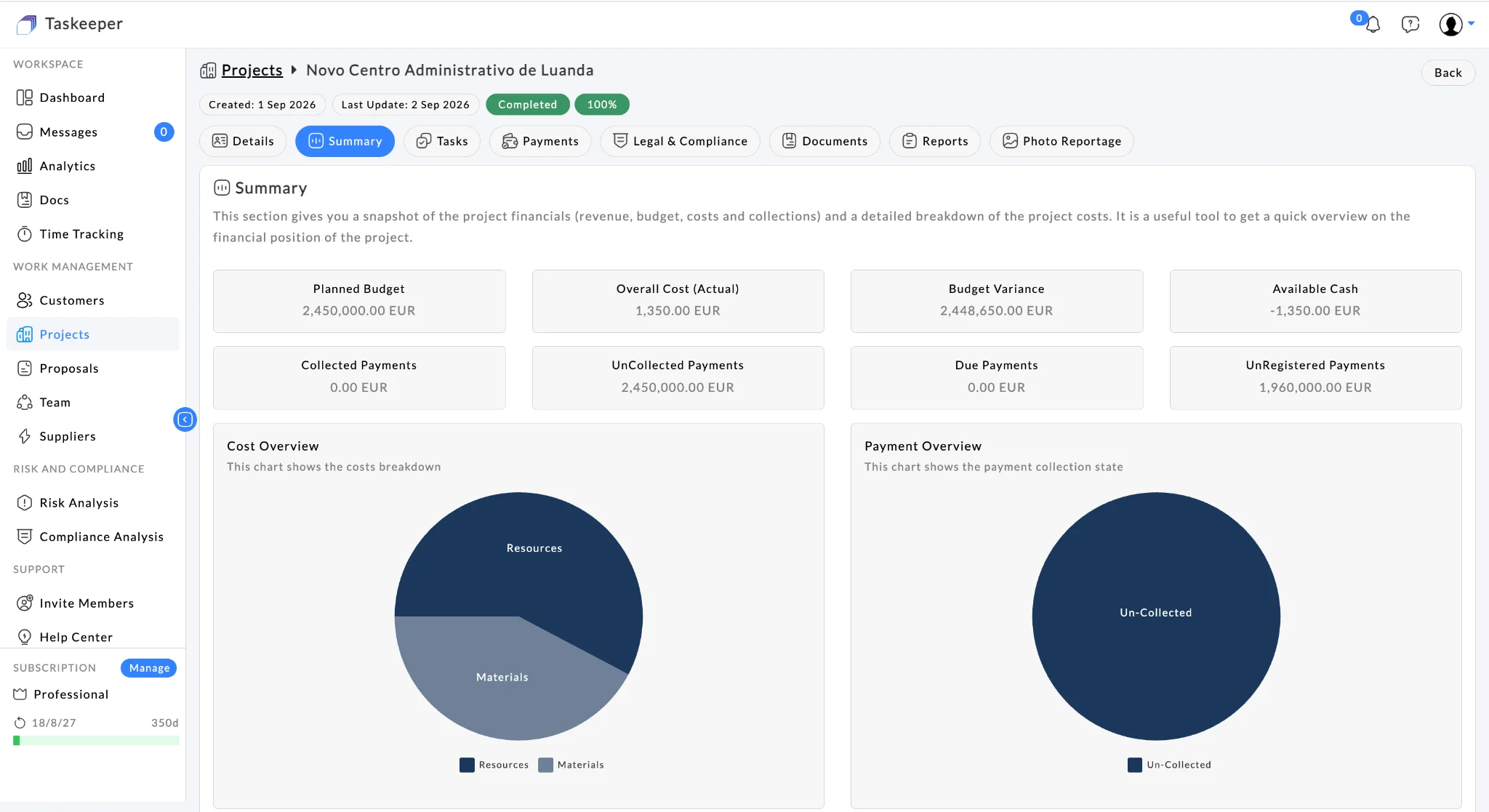
Project dashboard

See progress, hours, task status and team pressure together.

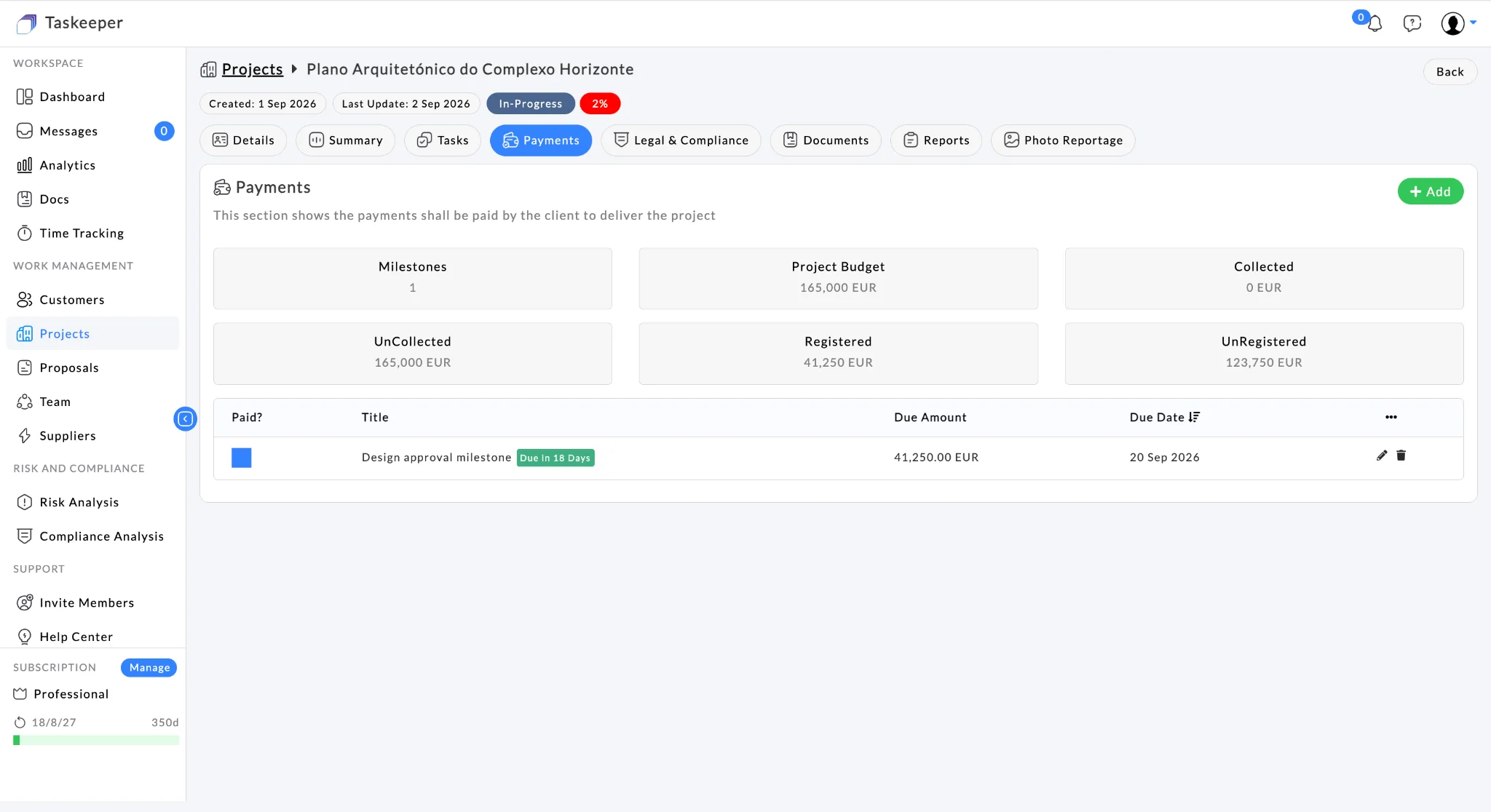
Taskeeper project summary showing budget, cost and payment position

Client project view

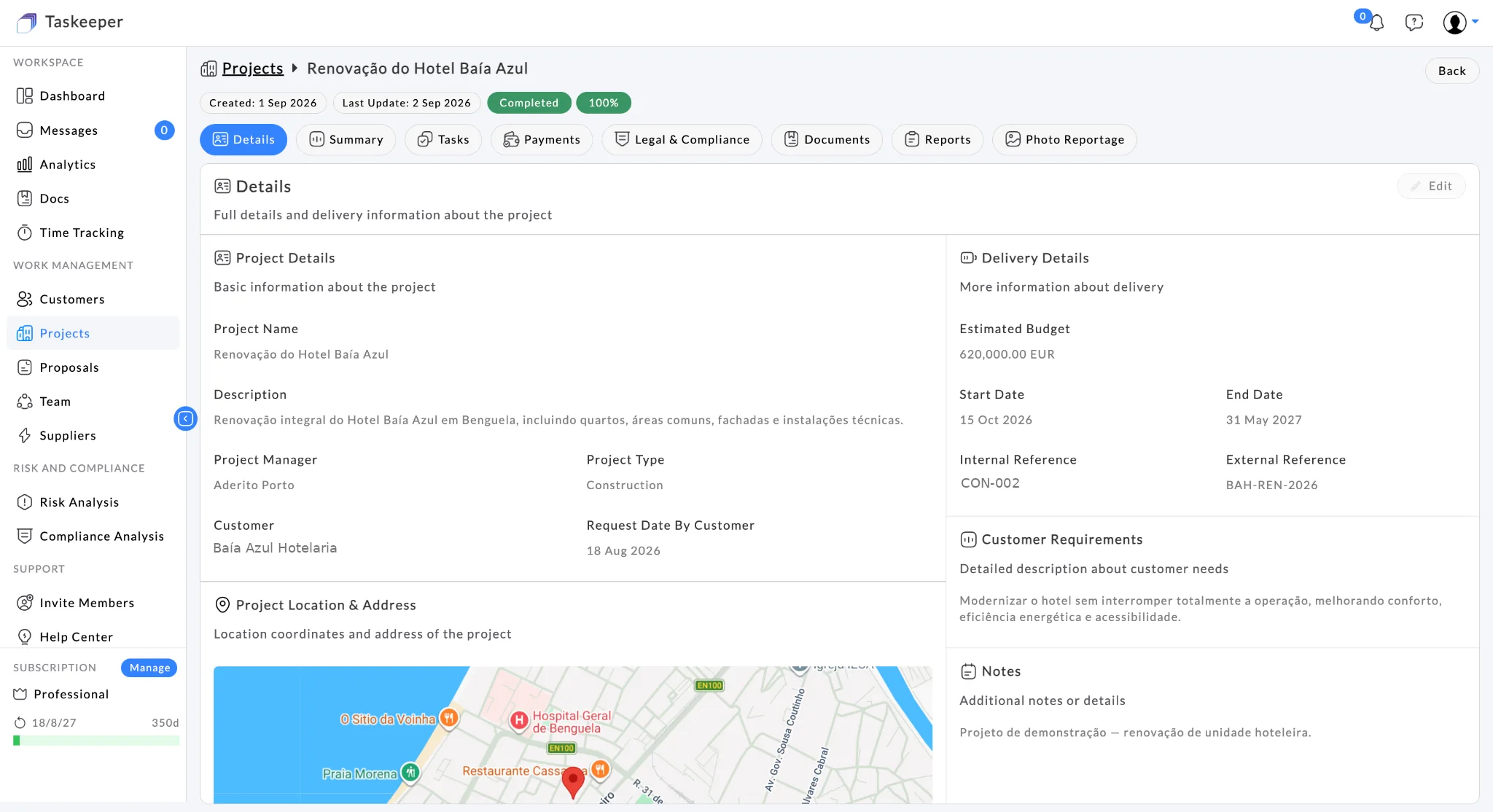
Keep milestones, updates and payment context visible in a client-facing project experience.

Taskeeper project details showing customer and delivery context

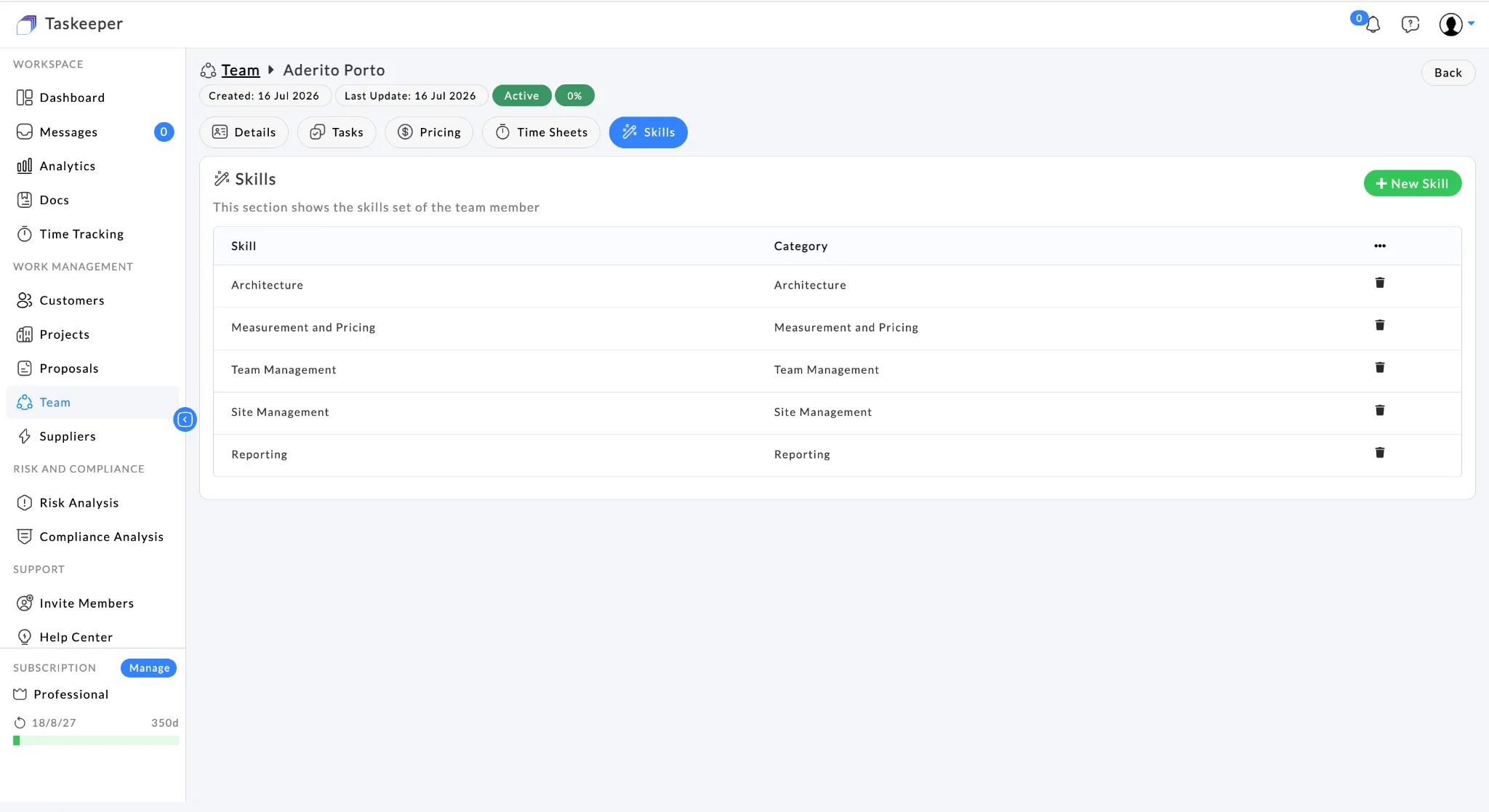
Resource reporting

Compare allocated and actual hours by project and resource.

Taskeeper resource skills view showing architecture, pricing, team and site management skills
04
Control the work

Control workload, money, risk and compliance before they become surprises.

Use resource utilisation and timesheets to understand people and effort; keep budgets and payments near delivery; surface compliance requirements and connect gaps to risk.

Commercial control

Budget, cost & payments

Track project budget position alongside task cost, external supplier cost and client payment milestones.

  • Project and task budgets
  • Cost breakdown
  • Payment milestones
  • Collected / uncollected visibility
  • Registered / unregistered payment status
Connects to Projects · Tasks · Suppliers · Analytics
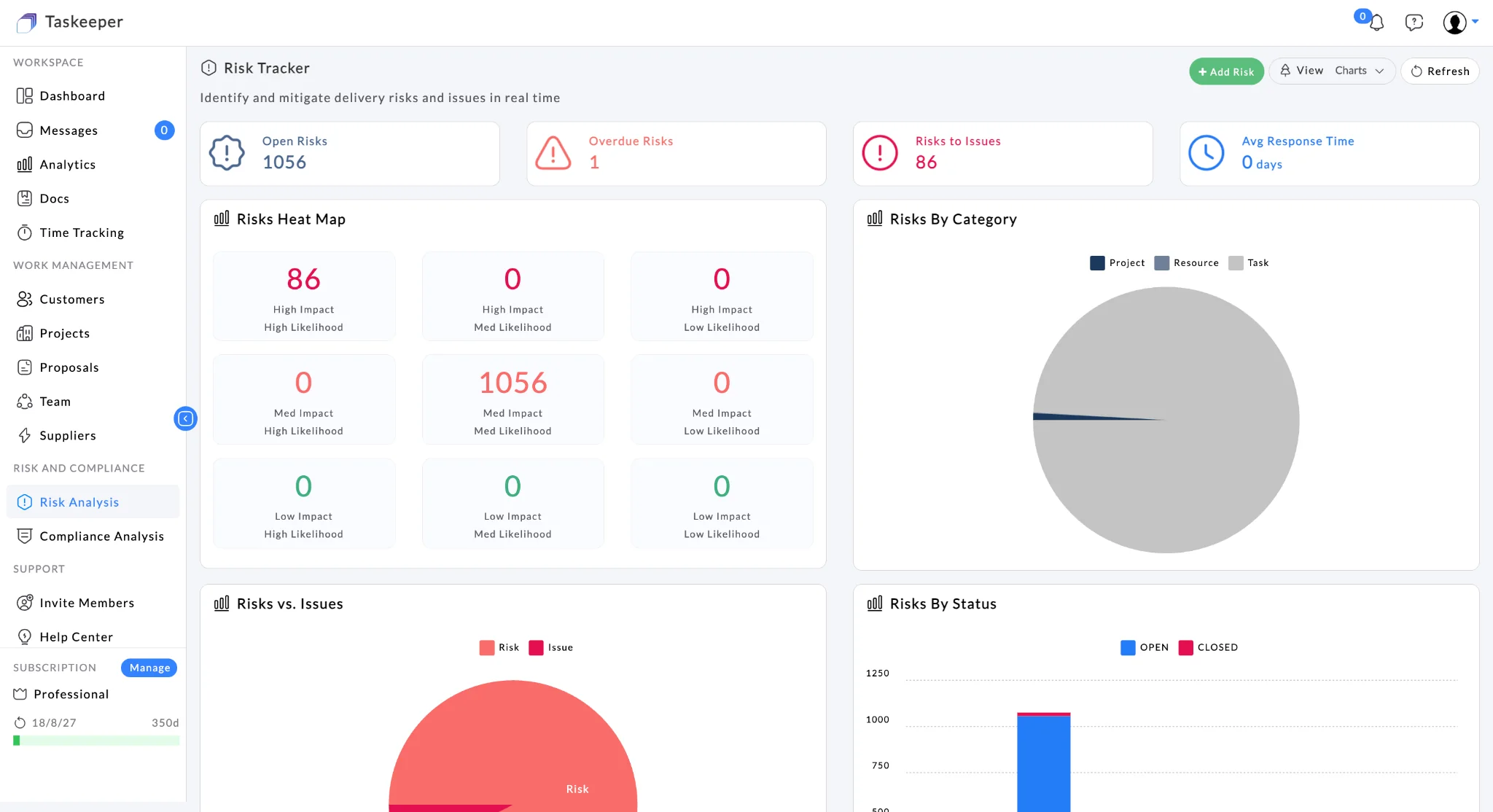
Risk

Risk tracking, mitigation & escalation

Track risks with ownership and structured control information rather than relying on informal notes.

  • Likelihood and impact
  • Owner and resolution date
  • Mitigation plan
  • Escalation level
  • Risk-to-issue visibility and heat map
Connects to Projects · Tasks · Analytics
Compliance

Compliance tracking

Maintain compliance status and surface overdue or non-compliant items alongside operational work.

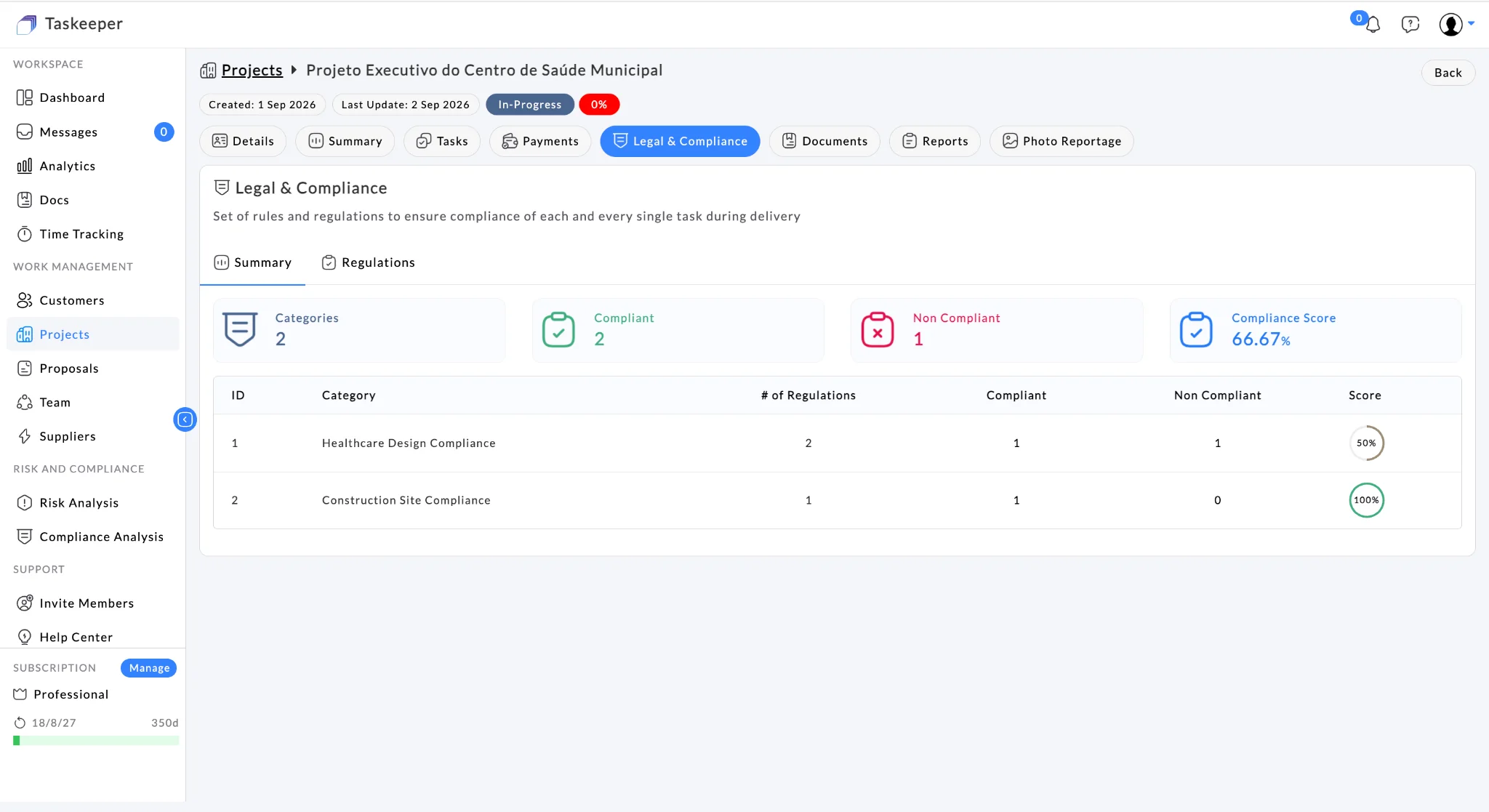
  • Compliant / non-compliant / overdue KPIs
  • Compliance score
  • Status and category views
  • Project legal & compliance context
Connects to Projects · Governance · Reporting
Suppliers

Supplier & external delivery cost

Keep supplier services and external parties visible inside project cost and delivery context.

  • Supplier management
  • Supplier service cost breakdown
  • External resource association
  • Commercial delivery context
Connects to Projects · Resources · Budget
05
Improve the business

Turn project activity into management information.

The analytics layer combines delivery and financial signals so management can see more than task completion.

Operational and commercial analytics

Analyse Active/Delivered projects alongside Expected Revenue, Expected Profit, Costs, Planned Budget, Received Payments, Actual Revenue, Actual Profit and Actual Budget.

RevenueProfitCostsBudgetPaymentsProjectsProposals
EXPECTED REVENUE€684k
RECEIVED€438k
ACTUAL PROFIT€96k
Demo values shown for product presentation.
Feature directory

Current capabilities at a glance.

A practical view of where each capability sits in the operating model and what it connects to.

CapabilityWhat it helps manageConnects naturally to
Customers / CRMOrganisations, individuals, contacts, interactions, addresses, affiliatesProposals · Projects
Proposal ManagementCommercial opportunity and project handoffCustomers · Projects · Budget
Project ManagementRequirements, location, dates, budget, delivery contextTasks · Payments · Compliance · Documents · Reports
Task ManagementTasks, subtasks, assignees, progress, delivery dates, budget/costResources · Time · Projects
Planning ViewsTable, Gantt, Kanban and Calendar viewsTasks · Project delivery
Team / ResourcesInternal/external people, skills, teams, business hours, pricingTasks · Time · Cost
Time TrackingMonthly work days, hours, rates and calculated amountsResources · Projects · Cost
DocumentsFiles, tags, project/task evidence and exportsProjects · Tasks · Reports
SuppliersExternal delivery parties and service cost contextProjects · Resources · Budget
Budget ManagementPlanned project/task financial boundaries and cost positionTasks · Suppliers · Payments · Analytics
PaymentsMilestones, due amount/date, collection and registration statusProjects · Budget · Analytics
Billing & InvoicingCommercial administration around delivered workCustomers · Projects · Payments
Risk ManagementLikelihood, impact, ownership, mitigation, escalation and issuesProjects · Tasks · Analytics
Compliance ManagementStatus, overdue controls, score and category trackingProjects · Governance · Reporting
Reports / Photo ProgressProject evidence, delivery outputs and completion contextProjects · Documents · Handover
AnalyticsProjects, proposals, revenue, profit, cost, budget and paymentsManagement decisions
Integration & onboarding

Adopt Taskeeper without rebuilding your technology landscape.

Start with Excel import/export templates for fast setup, exchange data through CSV where appropriate, and use Taskeeper APIs when you need a deeper system-to-system integration.

Import what you already have

Download the supported Excel import/export template, populate it with your current data and import it back into Taskeeper.

Excel templatesCustomer dataProjectsResourcesIncremental setup

Connect what should remain

Use APIs for deeper integrations or CSV consumption/production for lightweight exchange with finance, CRM, reporting or other operational systems.

APIsCSVSystem-to-systemData exchangeNo forced rip-and-replace
Construction operations, connected

Start with one workflow. Expand without rebuilding your operating picture.

Use Taskeeper for the problem you need to solve today, then connect more of the customer, project, workforce and commercial lifecycle as your team adopts it.

WinPlanDeliverControlImproveFeature directory